
Build better margin this fall and winter, plus take advantage of our brand new Overstock Margin Booster benefit
In order to take full advantage of HLC Integrations with Lightspeed R-Series, you've got to ask yourself; How do you start your ordering process with HLC?
Are you starting your order in your POS or you're starting from the b2b? Either way, we got you covered.
PO Creation
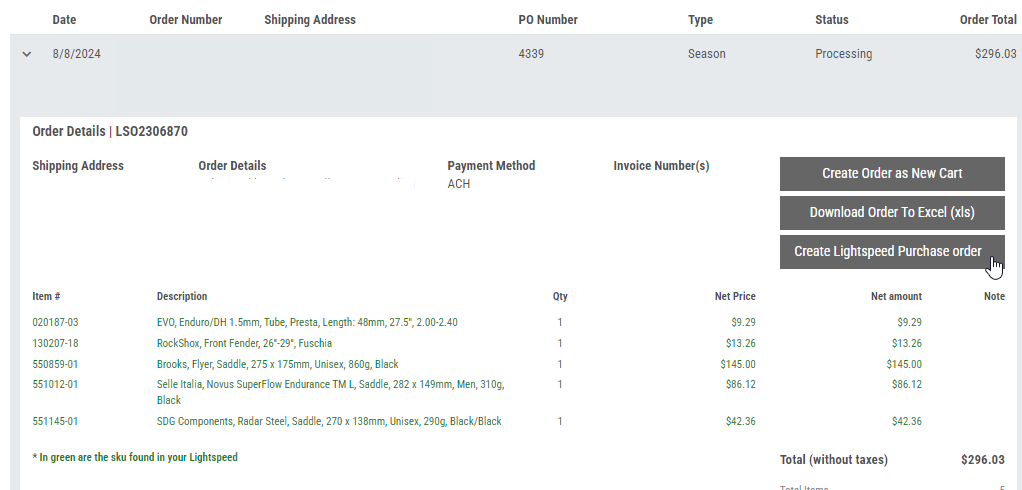
If you're starting your order on HLC's b2b, we can help you save time by creating your Lightspeed PO from our b2b. Once your POS is connected to HLC through the Lightspeed integration, you will see a new section at checkout called 'Lightspeed option'.

Matched items mean these products are already created in your Lightspeed POS
Unmatched items mean these products are not created or have incorrect information in your Lightspeed POS.
From there, the only thing you have to do is click on the checkbox and HLC will send a feed to create a PO automatically in your POS.
Forget to click on the checkbox? No worries, you can always go back in Order History and send a new feed.
Chrome Extension
If you're starting your PO in Lightspeed, we can also help you. The brand new HLC Chrome extension will populate additional information in the Purchase Order screen.
When connected, a new column called 'Vendor Availability' will be added to your purchase order. This will show HLC real-time inventory and whether or not it's in stock. The unit cost column will be updated to reflect your personalized pricing on HLC b2b. If an item is on closeout, the closeout price will show up. If you have a program discount, it will also be updated.

Once your order is ready to go, you can send it to HLC. There are two options available:
1. You can send your order on the b2b as a saved cart.
2. You can send your order directly to HLC system without going through the web
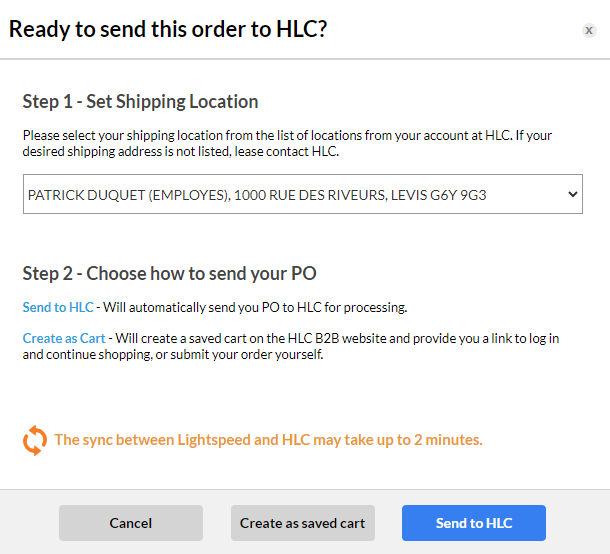
Out of stock items can't be added to a saved cart or to a final order.
Download the chrome extension here.
Virtual Analyst Tool for Lightspeed Users
At HLC, we're dedicated to providing our IBDs with the most cutting-edge solutions to meet their business requirements. With an eye toward innovation, HLC created a new feature that lets retailers using Lightspeed POS specify minimum and maximum inventory requirements. Based on these thresholds, merchants may see recommendations for products to reorder on their HLC dashboard.
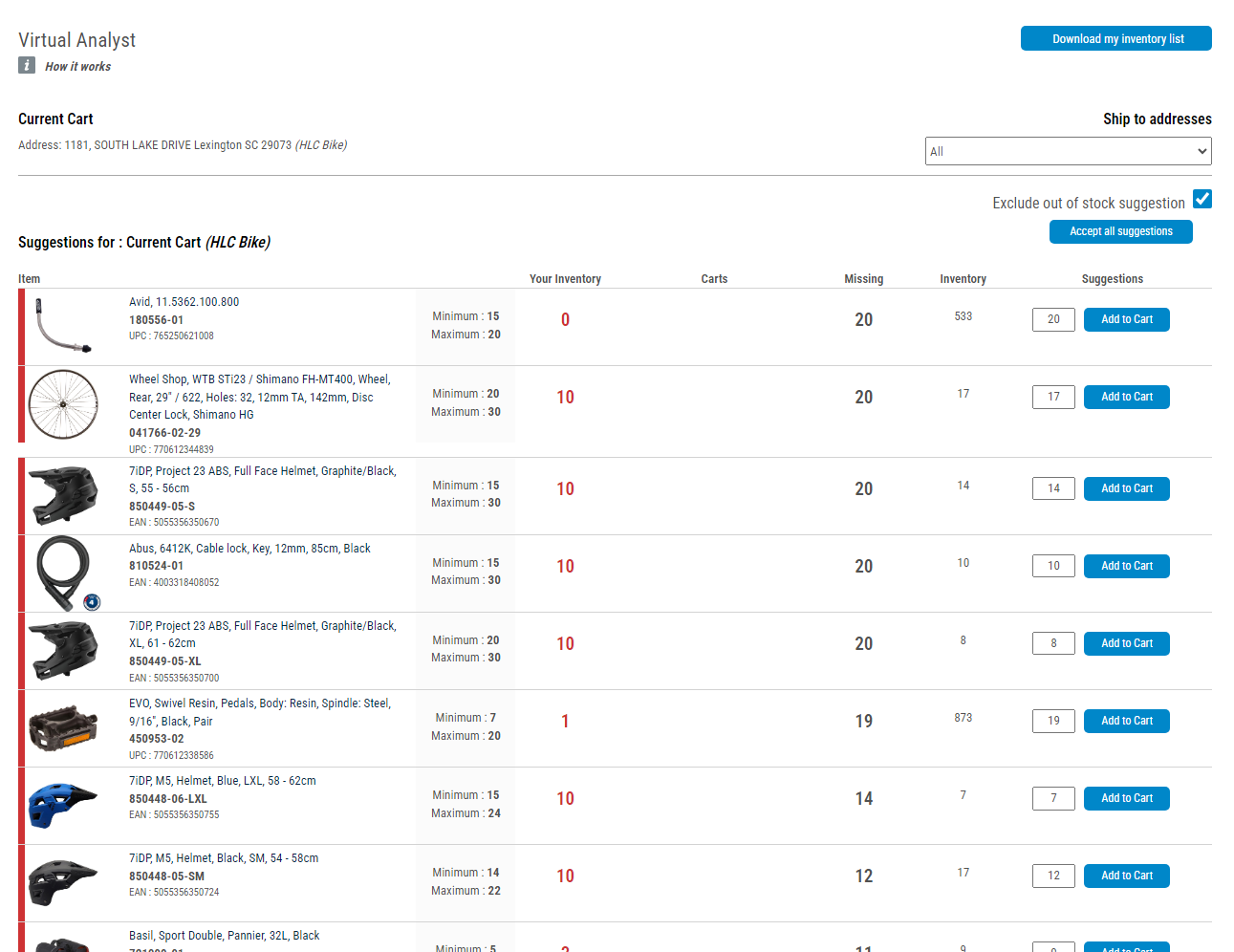
For a given delivery address (Lightspeed Shop Id), the Virtual Analyst tool will propose recommended purchases based on the products if the items in your Lightspeed POS have Automatic Replenishment filled in with the Reorder point (Min) and Inventory Level (Max).
Red highlights items that have dropped below the minimum order quantity (Min).
Orange indicates items that are about to drop below the reorder threshold (Min). When the inventory level of an item is greater than the minimum but less than 1.5 times the minimum, it is deemed to be "soon to fall below reorder point."
Sku matching: If there is no match between your products and the HLC items, we will look at the bar codes (either the UPC or the EAN) to see if there is a match.
What is Min/Max or Why should I use it?
In retail inventory management, the min-max system helps maintain optimal stock levels. “Min” represents the minimum quantity that should trigger a reorder, ensuring you never run out, while “max” is the maximum level indicating when to stop ordering. This approach minimizes stockouts and excess inventory, improving efficiency and cost-effectiveness for a business.
Determining the right min and max levels for a SKU involves balancing factors like demand variability, lead time, and service level goals. Analyzing historical data to understand this demand and lead time variability is key to getting levels correct as well as considering factors such as safety stock to account for unexpected fluctuations. Adjusting based on service level targets and business priorities and regularly reviewing and refining your parameters is key to success.
HLC is here to help analyze your historical data and provide insights into setting up your Virtual Analyst min-max levels all with the goal of preventing stockouts and avoiding excess inventory in your store. Let us know how we can help.
Qualify at the top level for 2+ of these 4 brands and you'll get access to all current Overstock Margin Booster pricing available at HLC
Brand
Buy-In Levels
Immed. Discount
Recur. Discount

$3,000
$1,000
$750
10%
5%
3%
6%
5%
3%
Dealers can also qualify with and earn standard discounts for Avid, Quarq, RockShox, Time and Truvativ
$500
$250
6%
3%
6%
3%
$500
$250
5%
3%
5%
3%

$500
$250
6%
3%
6%
3%
• Deadline to earn Overstock Margin Booster benefit is October 31, 2023
• Overstock Margin Booster pricing may take 3–5 business days after qualification to show on your account
• Overstock Margin Booster pricing is effective while quantity of eligible products last and may be subject to change without notice
All other standard Flex Plan brands are listed below. You must qualify for each brand separately to earn immediate/recurring discounts.
Brand
Buy-In Levels
Immed. Discount
Recur. Discount

$400
5%
5%

$500
$250
5%
3%
5%
3%

$300
$150
10%
3%
5%
3%
$1,500
$1,000
5%
3%
5%
3%

$300
$150
5%
3%
5%
3%

$500
$250
5%
3%
5%
3%
$500
$250
5%
3%
5%
3%

$500
$250
5%
3%
5%
3%
$1,500
$1,000
5%
3%
5%
3%

$500
$250
5%
3%
5%
3%

$500
$250
5%
3%
5%
3%

$500
$250
5%
3%
5%
3%

$500
$250
5%
3%
5%
3%
$300
$150
10%
3%
5%
3%

$300
$150
5%
3%
5%
3%

$500
$250
5%
3%
5%
3%

$1,000
3%
3%

$500
$250
5%
3%
5%
3%

$500
$250
5%
3%
5%
3%

$500
$250
5%
3%
5%
3%

$500
$250
5%
3%
5%
3%

$500
$250
5%
3%
5%
3%

$500
$250
5%
3%
5%
3%

$500
$250
5%
3%
5%
3%
$500
$250
5%
3%
5%
3%

$500
$250
5%
3%
5%
3%

$500
$250
5%
3%
5%
3%

$500
$250
5%
3%
5%
3%

$500
$250
5%
3%
5%
3%
$500
$250
5%
3%
5%
3%

$300
$150
5%
3%
5%
3%

$750
$500
$250
8%
5%
3%
8%
5%
3%
$500
$250
5%
3%
5%
3%
$1,500
3%
3%